文章摘要
前言 虽然可以为 jupyter 安装 jupyter-lsp 插件,实现 python 的 lsp 相关功能,但是编码体验仍然不如我平时使用的 neovim ,在查阅 github 后,发现已有 neovim 插件实现了这方面的功能,不过配置起来略微有些繁琐,顾决定将操作步骤记录下来,以便于后者学习参考。 前置环境 我的系统和相关工具链版本 OS: macOS 15.3 arm64 Kernel…
前言 虽然可以为 jupyter 安装 jupyter-lsp 插件,实现 python 的 lsp 相关功能,但是编码体验仍然不如我平时使用的 neovim ,在查阅 github 后,发现已有 neovim 插件实现了这方面的功能,不过配置起来略微有些繁琐,顾决定将操作步骤记录下来,以便于后者学习参考。 前置环境 我的系统和相关工具链版本 OS: macOS 15.3 arm64 Kernel: 24.3.0 Packages: 171 (brew) Shell: zsh 5.9 NVIM v0.10.4 Pyenv 2.4.23 + Python 3.12.8 博主 neovim 配置模板用的基于 lazy.nvim 的 LazyVim ,所以一会儿也会将 molten-nvim 插件中的教程转换为 LazyVim 插件的形式,其他配置文件模板请参考对应模板的语法。不过现阶段几乎所有的 neovim 模板都基于 lazy.vim ,所以插件其实是通用的。 以下是一会儿需要用到的 neovim 插件。 (主要插件) GitHub - benlubas/molten-nvim: A neovim plugin for interactively running code with the jupyter kernel. Fork of magma-nvim with improvements in image rendering, performance, and more GitHub - 3rd/image.nvim: 🖼️ Bringing images to Neovim. GitHub - quarto-dev/quarto-nvim: Quarto mode for Neovim GitHub - GCBallesteros/jupytext.nvim: Jupyter notebooks on neovim powered by Jupytext 安装 molten 所需 python 依赖 此处参考文档1 和文档 2 molten-nvim/docs/Not-So-Quick-Start-Guide.md at main · benlubas/molten-nvim · GitHub molten-nvim/docs/Virtual-Environments.md at main · benlubas/molten-nvim · GitHub 其中, molten 会用到 python ,博主使用 zinit 来管理 zsh 的相关插件, pyenv 是通过 zinit 来安装的,以下是我的配置参考 ## pyenv export PYENV_ROOT=$ZPFX/pyenv; export WORKON_HOME=$PYENV_ROOT/versions export PROJECT_HOME=$PYENV_ROOT/Devel zinit ice wait lucid as"program" depth"1" cloneopts"" pick"$ZPFX/pyenv/libexec/pyenv" id-as'pyenv' run-atpull atclone"echo pyenv installing at clone; export PYENV_ROOT=$ZPFX/pyenv; echo PYENV_ROOT: $ZPFX/pyenv; curl -fsSL https://pyenv.run | bash; $ZPFX/pyenv/libexec/pyenv init - | tee $ZPFX/pyenv/init.zsh" atpull"echo pyenv updating at pull; %atclone" atinit"source $ZPFX/pyenv/init.zsh;" zinit light zdharma-continuum/null 在 molten 的文档中可以注意到,他用的是 virtualenvs 来管理插件所需要的 python 依赖包,这里我用的是 pyenv ,所以使用的是 pyenv 自带的 pyenv-virtualenv 插件来创建虚拟环境,原理大同小异,也可以自定义使用其他虚拟包环境管理器。 使用以下命令创建并激活一个名为 neovim 的虚拟环境,随后使用 pip 安装 molten 所需 python 依赖。 pyenv virtualenv neovim pyenv activate neovim pip install pynvim jupyter_client cairosvg plotly kaleido pnglatex pyperclip nbformat 接着按照文档,修改 neovim 的配置,使其能找到当前虚拟环境中的 python 这里要注意,请先使用以下命令查看自己的 neovim 虚拟环境安装目录中, python 的路径 echo $VIRTUAL_ENV/bin/python3 博主的输出是如下内容 /Users/styunlen/.zinit/polaris/pyenv/versions/neovim/bin/python3 所以接下来我就在 neovim 的配置里写以下内容,如果你也像我一样在 zshrc 中声明了 WORKON_HOME 变量为 $PYENV_ROOT/versions ,则可以使用下面注释掉的那个写法 vim.g.python3_host_prog = vim.fn.expand("~/.zinit/polaris/pyenv/versions/neovim/bin/python3") -- vim.g.python3_host_prog = os.getenv("WORKON_HOME") .. "/neovim/bin/python3" 这些都操作完之后,我们进入工作目录,比如我的工作目录为 ~/WorkDir/Comp ,然后重新使用 pyenv (可以自定义)创建并激活一个包含数据分析、人工智能、数据可视化等常见 python 模块的虚拟环境 common 。 然后安装 ipykernel 包,并添加一个名为 neovim 的 ipykernel 核心,用于 jupyter 后期使用。 以下是相关命令: pyenv virtualenv common pyenv activate common pip install ipykernel python -m ipykernel install --user --name neovim 配置 neovim 此处参考文档 3 molten-nvim/docs/Notebook-Setup.md at main · benlubas/molten-nvim · GitHub 主要用于添加 neovim 对 ipynb 的直接编辑支持 由于我使用 LazyVim ,所以单独编写一个 lua 文件来配置与 molten 相关插件。如不想看详细步骤,可以直接跳转到 第二页 复制完整配置 使用以下命令配置插件 nvim ~/.config/nvim/lua/plugins/molten.lua 然后将最开始提到过的插件都加入其中,搭建一个框架 return { { "benlubas/molten-nvim", version = "^1.0.0", -- use version 2.0.0 to avoid breaking changes dependencies = { "3rd/image.nvim" }, build = ":UpdateRemotePlugins", init = function() end, }, { -- requires plugins in lua/plugins/treesitter.lua and lua/plugins/lsp.lua -- for complete functionality (language features) "quarto-dev/quarto-nvim", ft = { "quarto", "markdown" }, dev = false, config = function() end, dependencies = { -- for language features in code cells -- configured in lua/plugins/lsp.lua and -- added as a nvim-cmp source in lua/plugins/completion.lua "jmbuhr/otter.nvim", "nvim-treesitter/nvim-treesitter", }, }, { "GCBallesteros/jupytext.nvim", opts = { style = "markdown", output_extension = "md", force_ft = "markdown", }, }, { -- preview equations "jbyuki/nabla.nvim", keys = { { " leader qm", ':lua require"nabla".toggle_virt() cr ', desc = "toggle m]ath equations" }, }, }, { "nvim-lualine/lualine.nvim", dependencies = { "benlubas/molten-nvim", }, event = "VeryLazy", opts = function(_, opts) table.insert(opts.sections.lualine_y, { function() return require("molten.status").kernels() .. " (ipykernel)" end, }) end, }, { -- see the image.nvim readme for more information about configuring this plugin "3rd/image.nvim", opts = { backend = "kitty", -- whatever backend you would like to use processor = "magick_cli", -- or "magick_cli" max_width = 100, max_height = 12, max_height_window_percentage = math.huge, max_width_window_percentage = math.huge, window_overlap_clear_enabled = true, -- toggles images when windows are overlapped window_overlap_clear_ft_ignore = { "cmp_menu", "cmp_docs", "" }, }, }, } 接下来的步骤主要是分布完成 neovim 对 jupyter 以下四个功能的集成 代码运行 结果预览 markdown 中 Python LSP 的相关功能 (自动补全, 定义引用跳转, 快速重命名, 代码格式化等) 文件格式转换 上述框架中已经完成了插件集成和联动,比如 lualine 显示当前激活的 ipykernel ,但还没有添加快捷键映射、文件自动处理等功能,我们接下来根据上述框架,从上到下一一完善这个配置。 benlubas/molten-nvim 首先完善 benlubas/molten-nvim 插件的 init 方法,主要实现了以下几个功能 让 neovim 能找到我们为 molten 插件单独创建的虚拟环境,上面有个地方就是添加此处配置,只不过我把他集成到了此处 开启一些官方推荐的插件选项 官方推荐的快捷键绑定 打开 ipynb 文件时,自动初始化 molten 和 quarto 插件,并导入已有的运行结果数据;关闭时,自动导出运行结果数据 添加新建 jupyter notebook 的指令 代码如下 init = function() local function getenv(var) local v = os.getenv(var) if v == nil then return "" else return v end end -- vim.g.python3_host_prog=vim.fn.expand("") vim.g.python3_host_prog = getenv("WORKON_HOME") .. "/neovim/bin/python3" -- I find auto open annoying, keep in mind setting this option will require setting -- a keybind for `:noautocmd MoltenEnterOutput` to open the output again vim.g.molten_auto_open_output = false -- this guide will be using image.nvim -- Don't forget to setup and install the plugin if you want to view image outputs vim.g.molten_image_provider = "image.nvim" -- optional, I like wrapping. works for virt text and the output window vim.g.molten_wrap_output = true -- Output as virtual text. Allows outputs to always be shown, works with images, but can -- be buggy with longer images vim.g.molten_virt_text_output = true -- this will make it so the output shows up below the ``` cell delimiter vim.g.molten_virt_lines_off_by_1 = true -- these are examples, not defaults. Please see the readme vim.g.molten_image_provider = "image.nvim" vim.g.molten_output_win_max_height = 20 vim.keymap.set("n", " localleader mi", ":MoltenInit CR ", { silent = true, desc = "Initialize the plugin" }) vim.keymap.set( "n", " localleader e", ":MoltenEvaluateOperator CR ", { silent = true, desc = "run operator selection" } ) vim.keymap.set("n", " localleader rl", ":MoltenEvaluateLine CR ", { silent = true, desc = "evaluate line" }) vim.keymap.set("n", " localleader rr", ":MoltenReevaluateCell CR ", { silent = true, desc = "re-evaluate cell" }) vim.keymap.set( "v", " localleader rv", ": C-u MoltenEvaluateVisual CR gv", { silent = true, desc = "evaluate visual selection" } ) vim.keymap.set("n", " localleader rd", ":MoltenDelete CR ", { silent = true, desc = "molten delete cell" }) vim.keymap.set("n", " localleader oh", ":MoltenHideOutput CR ", { silent = true, desc = "hide output" }) vim.keymap.set( "n", " localleader os", ":noautocmd MoltenEnterOutput CR ", { silent = true, desc = "show/enter output" } ) -- if you work with html outputs: vim.keymap.set( "n", " localleader mx", ":MoltenOpenInBrowser CR ", { desc = "open output in browser", silent = true } ) local imb = function(e) -- init molten buffer vim.schedule(function() vim.cmd("MoltenInit") vim.cmd("MoltenImportOutput") vim.cmd("QuartoActivate") end) end -- automatically import output chunks from a jupyter notebook vim.api.nvim_create_autocmd("BufAdd", { pattern = { "*.ipynb" }, callback = imb, }) -- we have to do this as well so that we catch files opened like nvim ./hi.ipynb vim.api.nvim_create_autocmd("BufEnter", { pattern = { "*.ipynb" }, callback = function(e) if vim.api.nvim_get_vvar("vim_did_enter") ~= 1 then imb(e) end end, }) -- automatically export output chunks to a jupyter notebook on write vim.api.nvim_create_autocmd("BufWritePost", { pattern = { "*.ipynb" }, callback = function() if require("molten.status").initialized() == "Molten" then vim.cmd("MoltenExportOutput!") end end, }) -- Provide a command to create a blank new Python notebook -- note: the metadata is needed for Jupytext to understand how to parse the notebook. -- if you use another language than Python, you should change it in the template. local default_notebook = { "cells": { "cell_type": "markdown", "metadata": {}, "source": "" ] } ], "metadata": { "kernelspec": { "display_name": "Python 3", "language": "python", "name": "python3" }, "language_info": { "codemirror_mode": { "name": "ipython" }, "file_extension": ".py", "mimetype": "text/x-python", "name": "python", "nbconvert_exporter": "python", "pygments_lexer": "ipython3" } }, "nbformat": 4, "nbformat_minor": 5 } ]] local function new_notebook(filename) local path = filename .. ".ipynb" local file = io.open(path, "w") if file then file:write(default_notebook) file:close() vim.cmd("edit " .. path) else print("Error: Could not open new notebook file for writing.") end end vim.api.nvim_create_user_command("NewNotebook", function(opts) new_notebook(opts.args) end, { nargs = 1, complete = "file", }) end, quarto-dev/quarto-nvim 文档中在做这一步之前,需要先为 nvim-treesitter 添加一个新的选择器,方便我们在编辑 ipynb 时,快速上下跳转,可以输入以下命令快捷完成 cat ~/.config/nvim/after/queries/markdown/textobjects.scm EOF ;; extends (fenced_code_block (code_fence_content) @code_cell.inner) @code_cell.outer EOF 然后配置 quarto-dev/quarto-nvim 插件的 config 函数,主要实现以下几个功能 将 code runner 设置为 molten ,连接两个插件 使用一些官方文档推荐的配置和快捷键 扩展 nvim-treesitter 插件 代码如下 config = function() require("quarto").setup({ lspFeatures = { -- NOTE: put whatever languages you want here: languages = { "r", "python", "rust" }, chunks = "all", diagnostics = { enabled = true, triggers = { "BufWritePost" }, }, completion = { enabled = true, }, }, keymap = { -- NOTE: setup your own keymaps: hover = "H", definition = "gd", rename = " leader rn", references = "gr", format = " leader gf", }, codeRunner = { enabled = true, default_method = "molten", }, }) local runner = require("quarto.runner") vim.keymap.set("n", " localleader rc", runner.run_cell, { desc = "run cell", silent = true }) vim.keymap.set("n", " localleader ra", runner.run_above, { desc = "run cell and above", silent = true }) vim.keymap.set("n", " localleader rA", runner.run_all, { desc = "run all cells", silent = true }) vim.keymap.set("n", " localleader rl", runner.run_line, { desc = "run line", silent = true }) vim.keymap.set("v", " localleader r", runner.run_range, { desc = "run visual range", silent = true }) vim.keymap.set("n", " localleader RA", function() runner.run_all(true) end, { desc = "run all cells of all languages", silent = true }) require("nvim-treesitter.configs").setup({ -- ... other ts config textobjects = { move = { enable = true, set_jumps = false, -- you can change this if you want. goto_next_start = { --- ... other keymaps "]b"] = { query = "@code_cell.inner", desc = "next code block" }, }, goto_previous_start = { --- ... other keymaps " b"] = { query = "@code_cell.inner", desc = "previous code block" }, }, }, select = { enable = true, lookahead = true, -- you can change this if you want keymaps = { --- ... other keymaps "ib"] = { query = "@code_cell.inner", desc = "in block" }, "ab"] = { query = "@code_cell.outer", desc = "around block" }, }, }, swap = { -- Swap only works with code blocks that are under the same -- markdown header enable = true, swap_next = { --- ... other keymap " leader sbl"] = "@code_cell.outer", }, swap_previous = { --- ... other keymap " leader sbh"] = "@code_cell.outer", }, }, }, }) end, 总结 完成以上内容后,就基本完成了所有配置,我们进入工作目录随意打开一个 jupyter notebook 试试,OK,完成! 参考文档 molten-nvim/docs/Not-So-Quick-Start-Guide.md at main · benlubas/molten-nvim · GitHub molten-nvim/docs/Virtual-Environments.md at main · benlubas/molten-nvim · GitHub molten-nvim/docs/Notebook-Setup.md at main · benlubas/molten-nvim · GitHub return { { "benlubas/molten-nvim", version = "^1.0.0", -- use version 2.0.0 to avoid breaking changes dependencies = { "3rd/image.nvim" }, build = ":UpdateRemotePlugins", init = function() local function getenv(var) local v = os.getenv(var) if v == nil then return "" else return v end end -- vim.g.python3_host_prog=vim.fn.expand("") vim.g.python3_host_prog = getenv("WORKON_HOME") .. "/neovim/bin/python3" -- I find auto open annoying, keep in mind setting this option will require setting -- a keybind for `:noautocmd MoltenEnterOutput` to open the output again vim.g.molten_auto_open_output = false -- this guide will be using image.nvim -- Don't forget to setup and install the plugin if you want to view image outputs vim.g.molten_image_provider = "image.nvim" -- optional, I like wrapping. works for virt text and the output window vim.g.molten_wrap_output = true -- Output as virtual text. Allows outputs to always be shown, works with images, but can -- be buggy with longer images vim.g.molten_virt_text_output = true -- this will make it so the output shows up below the ``` cell delimiter vim.g.molten_virt_lines_off_by_1 = true -- these are examples, not defaults. Please see the readme vim.g.molten_image_provider = "image.nvim" vim.g.molten_output_win_max_height = 20 vim.keymap.set("n", " localleader mi", ":MoltenInit CR ", { silent = true, desc = "Initialize the plugin" }) vim.keymap.set( "n", " localleader e", ":MoltenEvaluateOperator CR ", { silent = true, desc = "run operator selection" } ) vim.keymap.set("n", " localleader rl", ":MoltenEvaluateLine CR ", { silent = true, desc = "evaluate line" }) vim.keymap.set("n", " localleader rr", ":MoltenReevaluateCell CR ", { silent = true, desc = "re-evaluate cell" }) vim.keymap.set( "v", " localleader rv", ": C-u MoltenEvaluateVisual CR gv", { silent = true, desc = "evaluate visual selection" } ) vim.keymap.set("n", " localleader rd", ":MoltenDelete CR ", { silent = true, desc = "molten delete cell" }) vim.keymap.set("n", " localleader oh", ":MoltenHideOutput CR ", { silent = true, desc = "hide output" }) vim.keymap.set( "n", " localleader os", ":noautocmd MoltenEnterOutput CR ", { silent = true, desc = "show/enter output" } ) -- if you work with html outputs: vim.keymap.set( "n", " localleader mx", ":MoltenOpenInBrowser CR ", { desc = "open output in browser", silent = true } ) -- automatically import output chunks from a jupyter notebook -- tries to find a kernel that matches the kernel in the jupyter notebook -- falls back to a kernel that matches the name of the active venv (if any) local imb = function(e) -- init molten buffer vim.schedule(function() local kernels = vim.fn.MoltenAvailableKernels() local try_kernel_name = function() local metadata = vim.json.decode(io.open(e.file, "r"):read("a")) "metadata"] return metadata.kernelspec.name end local ok, kernel_name = pcall(try_kernel_name) if not ok or not vim.tbl_contains(kernels, kernel_name) then kernel_name = nil local venv = os.getenv("VIRTUAL_ENV") or os.getenv("CONDA_PREFIX") if venv ~= nil then kernel_name = string.match(venv, "/.+/(.+)") end end if kernel_name ~= nil and vim.tbl_contains(kernels, kernel_name) then vim.cmd(("MoltenInit %s"):format(kernel_name)) end vim.cmd("MoltenImportOutput") vim.cmd("QuartoActivate") end) end -- automatically import output chunks from a jupyter notebook vim.api.nvim_create_autocmd("BufAdd", { pattern = { "*.ipynb" }, callback = imb, }) -- we have to do this as well so that we catch files opened like nvim ./hi.ipynb vim.api.nvim_create_autocmd("BufEnter", { pattern = { "*.ipynb" }, callback = function(e) if vim.api.nvim_get_vvar("vim_did_enter") ~= 1 then imb(e) end end, }) -- automatically export output chunks to a jupyter notebook on write vim.api.nvim_create_autocmd("BufWritePost", { pattern = { "*.ipynb" }, callback = function() if require("molten.status").initialized() == "Molten" then vim.cmd("MoltenExportOutput!") end end, }) -- Provide a command to create a blank new Python notebook -- note: the metadata is needed for Jupytext to understand how to parse the notebook. -- if you use another language than Python, you should change it in the template. local default_notebook = { "cells": { "cell_type": "markdown", "metadata": {}, "source": "" ] } ], "metadata": { "kernelspec": { "display_name": "Python 3", "language": "python", "name": "python3" }, "language_info": { "codemirror_mode": { "name": "ipython" }, "file_extension": ".py", "mimetype": "text/x-python", "name": "python", "nbconvert_exporter": "python", "pygments_lexer": "ipython3" } }, "nbformat": 4, "nbformat_minor": 5 } ]] local function new_notebook(filename) local path = filename .. ".ipynb" local file = io.open(path, "w") if file then file:write(default_notebook) file:close() vim.cmd("edit " .. path) else print("Error: Could not open new notebook file for writing.") end end vim.api.nvim_create_user_command("NewNotebook", function(opts) new_notebook(opts.args) end, { nargs = 1, complete = "file", }) end, }, { -- requires plugins in lua/plugins/treesitter.lua and lua/plugins/lsp.lua -- for complete functionality (language features) "quarto-dev/quarto-nvim", ft = { "quarto", "markdown" }, dev = false, config = function() require("quarto").setup({ lspFeatures = { -- NOTE: put whatever languages you want here: languages = { "r", "python", "rust" }, chunks = "all", diagnostics = { enabled = true, triggers = { "BufWritePost" }, }, completion = { enabled = true, }, }, keymap = { -- NOTE: setup your own keymaps: hover = "H", definition = "gd", rename = " leader rn", references = "gr", format = " leader gf", }, codeRunner = { enabled = true, default_method = "molten", }, }) local runner = require("quarto.runner") vim.keymap.set("n", " localleader rc", runner.run_cell, { desc = "run cell", silent = true }) vim.keymap.set("n", " localleader ra", runner.run_above, { desc = "run cell and above", silent = true }) vim.keymap.set("n", " localleader rA", runner.run_all, { desc = "run all cells", silent = true }) vim.keymap.set("n", " localleader rl", runner.run_line, { desc = "run line", silent = true }) vim.keymap.set("v", " localleader r", runner.run_range, { desc = "run visual range", silent = true }) vim.keymap.set("n", " localleader RA", function() runner.run_all(true) end, { desc = "run all cells of all languages", silent = true }) require("nvim-treesitter.configs").setup({ -- ... other ts config textobjects = { move = { enable = true, set_jumps = false, -- you can change this if you want. goto_next_start = { --- ... other keymaps "]b"] = { query = "@code_cell.inner", desc = "next code block" }, }, goto_previous_start = { --- ... other keymaps " b"] = { query = "@code_cell.inner", desc = "previous code block" }, }, }, select = { enable = true, lookahead = true, -- you can change this if you want keymaps = { --- ... other keymaps "ib"] = { query = "@code_cell.inner", desc = "in block" }, "ab"] = { query = "@code_cell.outer", desc = "around block" }, }, }, swap = { -- Swap only works with code blocks that are under the same -- markdown header enable = true, swap_next = { --- ... other keymap " leader sbl"] = "@code_cell.outer", }, swap_previous = { --- ... other keymap " leader sbh"] = "@code_cell.outer", }, }, }, }) end, dependencies = { -- for language features in code cells -- configured in lua/plugins/lsp.lua and -- added as a nvim-cmp source in lua/plugins/completion.lua "jmbuhr/otter.nvim", "nvim-treesitter/nvim-treesitter", }, }, { "GCBallesteros/jupytext.nvim", opts = { style = "markdown", output_extension = "md", force_ft = "markdown", }, }, { -- preview equations "jbyuki/nabla.nvim", keys = { { " leader qm", ':lua require"nabla".toggle_virt() cr ', desc = "toggle m]ath equations" }, }, }, -- { -- "nvim-lualine/lualine.nvim", -- dependencies = { -- "benlubas/molten-nvim", -- }, -- event = "VeryLazy", -- opts = function(_, opts) -- table.insert(opts.sections.lualine_y, { -- require("molten.status").kernels(), -- }) -- end, -- }, { -- see the image.nvim readme for more information about configuring this plugin "3rd/image.nvim", opts = { backend = "kitty", -- whatever backend you would like to use processor = "magick_cli", -- or "magick_cli" max_width = 100, max_height = 12, max_height_window_percentage = math.huge, max_width_window_percentage = math.huge, window_overlap_clear_enabled = true, -- toggles images when windows are overlapped window_overlap_clear_ft_ignore = { "cmp_menu", "cmp_docs", "" }, }, }, } 上一页 1 2 下一页前言
虽然可以为jupyter安装 jupyter-lsp 插件,实现 python 的 lsp 相关功能,但是编码体验仍然不如我平时使用的 neovim,在查阅github后,发现已有neovim插件实现了这方面的功能,不过配置起来略微有些繁琐,顾决定将操作步骤记录下来,以便于后者学习参考。
前置环境
我的系统和相关工具链版本
- OS: macOS 15.3 arm64
- Kernel: 24.3.0
- Packages: 171 (brew)
- Shell: zsh 5.9
- NVIM v0.10.4
- Pyenv 2.4.23 + Python 3.12.8
博主 neovim 配置模板用的基于 lazy.nvim 的 LazyVim ,所以一会儿也会将 molten-nvim插件中的教程转换为LazyVim插件的形式,其他配置文件模板请参考对应模板的语法。不过现阶段几乎所有的 neovim 模板都基于 lazy.vim,所以插件其实是通用的。
以下是一会儿需要用到的neovim 插件。
- (主要插件) GitHub - benlubas/molten-nvim: A neovim plugin for interactively running code with the jupyter kernel. Fork of magma-nvim with improvements in image rendering, performance, and more
- GitHub - 3rd/image.nvim: 🖼️ Bringing images to Neovim.
- GitHub - quarto-dev/quarto-nvim: Quarto mode for Neovim
- GitHub - GCBallesteros/jupytext.nvim: Jupyter notebooks on neovim powered by Jupytext
安装 molten 所需 python 依赖
其中,molten 会用到 python,博主使用 zinit 来管理 zsh 的相关插件,pyenv 是通过 zinit 来安装的,以下是我的配置参考
在 molten的文档中可以注意到,他用的是 virtualenvs来管理插件所需要的 python 依赖包,这里我用的是 pyenv,所以使用的是 pyenv 自带的 pyenv-virtualenv插件来创建虚拟环境,原理大同小异,也可以自定义使用其他虚拟包环境管理器。
使用以下命令创建并激活一个名为 neovim 的虚拟环境,随后使用 pip 安装 molten 所需 python 依赖。
接着按照文档,修改 neovim 的配置,使其能找到当前虚拟环境中的 python
这里要注意,请先使用以下命令查看自己的 neovim 虚拟环境安装目录中,python 的路径
博主的输出是如下内容
所以接下来我就在 neovim 的配置里写以下内容,如果你也像我一样在 zshrc 中声明了WORKON_HOME变量为$PYENV_ROOT/versions,则可以使用下面注释掉的那个写法
这些都操作完之后,我们进入工作目录,比如我的工作目录为~/WorkDir/Comp,然后重新使用 pyenv(可以自定义)创建并激活一个包含数据分析、人工智能、数据可视化等常见python模块的虚拟环境common。
然后安装 ipykernel包,并添加一个名为 neovim 的ipykernel核心,用于 jupyter 后期使用。
以下是相关命令:
配置 neovim
此处参考文档 3
主要用于添加 neovim 对 ipynb 的直接编辑支持
由于我使用 LazyVim,所以单独编写一个 lua 文件来配置与 molten 相关插件。如不想看详细步骤,可以直接跳转到第二页复制完整配置
使用以下命令配置插件
然后将最开始提到过的插件都加入其中,搭建一个框架
接下来的步骤主要是分布完成 neovim 对 jupyter 以下四个功能的集成
- 代码运行
- 结果预览
markdown中Python LSP的相关功能 (自动补全, 定义引用跳转, 快速重命名, 代码格式化等)- 文件格式转换
上述框架中已经完成了插件集成和联动,比如 lualine 显示当前激活的 ipykernel,但还没有添加快捷键映射、文件自动处理等功能,我们接下来根据上述框架,从上到下一一完善这个配置。
benlubas/molten-nvim
首先完善benlubas/molten-nvim插件的 init 方法,主要实现了以下几个功能
- 让
neovim能找到我们为molten插件单独创建的虚拟环境,上面有个地方就是添加此处配置,只不过我把他集成到了此处 - 开启一些官方推荐的插件选项
- 官方推荐的快捷键绑定
- 打开
ipynb文件时,自动初始化molten和quarto插件,并导入已有的运行结果数据;关闭时,自动导出运行结果数据 - 添加新建
jupyter notebook的指令
代码如下
quarto-dev/quarto-nvim
文档中在做这一步之前,需要先为 nvim-treesitter 添加一个新的选择器,方便我们在编辑ipynb时,快速上下跳转,可以输入以下命令快捷完成
然后配置 quarto-dev/quarto-nvim插件的config函数,主要实现以下几个功能
- 将
code runner设置为molten,连接两个插件 - 使用一些官方文档推荐的配置和快捷键
- 扩展
nvim-treesitter插件
代码如下
总结
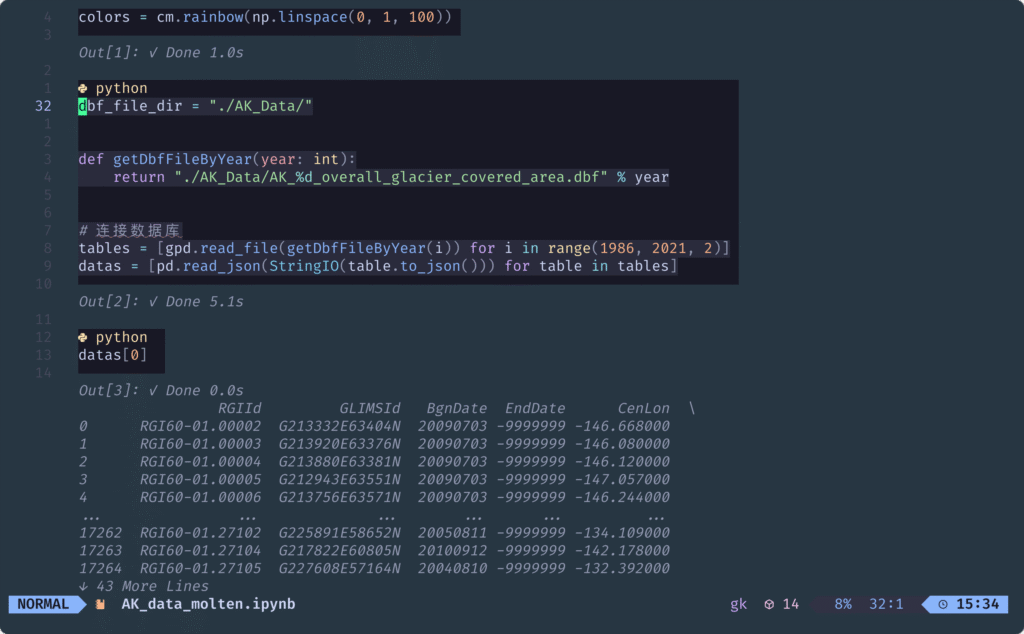
完成以上内容后,就基本完成了所有配置,我们进入工作目录随意打开一个jupyter notebook试试,OK,完成!

参考文档
本文采用 CC BY-NC-SA 4.0 协议进行授权,如无注明均为原创,转载请注明出处。
标题:如何让neovim 集成 jupyter作者:九仞之行链接:https://dev.styunlen.cn/archives/post-1711.html
